
How Texas Hold’em Is Presented on Tablet Screens?
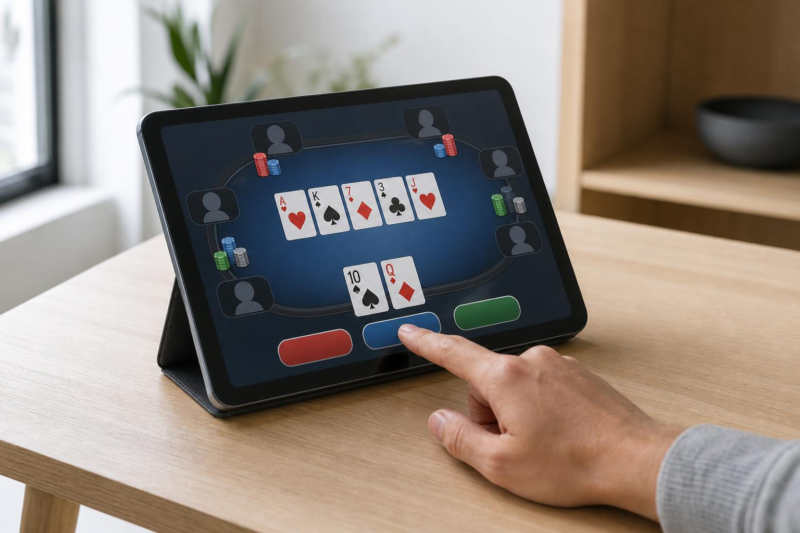
A poker table puts a lot of information in front of a player. There are cards to read, chip amounts to follow and decisions to make when a turn arrives. Moving that table onto a tablet means finding room for everything while leaving enough space for fingers to tap the controls.
Larger suit symbols can make cards easier to recognize. A numerical label makes a chip stack’s value readable, while turning the device can change the view of the table.
Fitting the Table to the Screen
For someone viewing Texas Hold’em through 888poker, the screen needs to make the relationship between private cards, shared cards and betting actions easy to follow.
Each player receives two private cards. Five community cards then appear in stages: three together, followed by two individual cards. Keeping the shared board separate from player information gives the hand a recognizable structure.
How that structure fills the screen can change with orientation. Some poker apps switch between a close-up view and a top-down view of the table, while landscape and portrait layouts arrange the same elements in different ways.
Other details can sit behind a menu or icon. Tournament information, for example, has been moved into an information panel in mobile poker software, freeing space on the table itself.
Giving Cards Room to Be Read
Within that layout, small markings carry important information. A rank and suit must remain recognizable beside player names, chip amounts and controls.
Poker-app updates have introduced larger numbers and suit symbols, as well as four-color decks. One common arrangement uses red hearts, black spades, green clubs and blue diamonds. That gives each suit a separate color alongside its familiar shape.
Both forms of identification have a role. Apple’s accessibility guidance recommends using shapes or icons with color, giving people more than one way to distinguish information.
The background matters too. Strong contrast helps card markings stand out, while spacing keeps neighboring details from running together. High-resolution artwork supports sharp edges and symbols.
These choices affect the whole table: card faces need enough room to remain readable while leaving space for the amounts and actions that accompany them.
Showing What the Chips Are Worth
Chip graphics give an on-screen table a familiar appearance. The numbers beside them tell the player how much is involved.
Some mobile interfaces offer a choice between displaying a stack as a chip count or as a number of big blinds. In Hold’em, the big blind is the larger of the two forced opening bets, alongside the small blind.
For example, with blinds of 600 and 1,200, a stack of 18,240 chips can appear as 15.2 big blinds, since 18,240 divided by 1,200 is 15.2.
The second display expresses the stack relative to the current betting level. Some interfaces let users switch between the two by selecting their player image.
Placement helps explain the figures. A remaining stack, a bet and the pot describe different amounts, so their labels need to stay distinguishable as chips move through a hand.
Making Betting Controls Work for Fingers
Once those amounts are visible, the controls provide ways to act on them. Buttons handle folding, checking and calling; a slider or shortcut can select a betting amount.
Mobile poker software includes customizable betting buttons, with separate options for actions before and after the first three community cards appear. Sliders can also keep selections within the game’s permitted minimum and maximum.
For touchscreen use, the area that responds to a finger deserves attention. Apple’s design guidance recommends controls measuring at least 44 by 44 points. Google recommends Android touch targets of at least 48 by 48 density-independent pixels.
The visible icon can occupy less space than its touch target. Padding around it can form part of the tappable area, while gaps between neighboring controls help keep their boundaries separate. These platform recommendations provide useful benchmarks for tablet interfaces.
Keeping Limits and Break Options Accessible
The same care with labels and controls applies to account settings. Poker platforms used in Canada offer time and money limits, session reminders and account locks.
A reminder draws attention to elapsed time. An account lock restricts access for a chosen period, while self-exclusion offers a route to a longer break.
In Ontario, the Registrar's Standards for Internet Gaming set responsible gambling requirements for regulated sites, and the Responsible Gambling Council offers information and support resources across Canada.
Real-money gambling carries financial risk and is restricted to adults who meet local eligibility requirements. Anyone concerned about their gambling can use exclusion tools and seek local support.
On a tablet, these settings are part of the interface too. They deserve the readable text, clear purpose and accessible controls that help users navigate the table.

Jim's passion for Apple products ignited in 2007 when Steve Jobs introduced the first iPhone. This was a canon event in his life. Noticing a lack of iPad-focused content that is easy to understand even for “tech-noob”, he decided to create Tabletmonkeys in 2011.
Jim continues to share his expertise and passion for tablets, helping his audience as much as he can with his motto “One Swipe at a Time!”