
Top 10 AI Video Generators for YouTube Shorts and TikTok in 2026: Which Platform Is Actually Worth Using?
Publishing high-quality Shorts and TikTok videos every day used to require a camera, editing software, and hours of manual work. In 2026, AI video generators have completely changed that process. Instead of spending an entire afternoon making a single video, I can test multiple creative ideas, compare different visual styles, and publish content much more consistently.
What surprised me most during testing is that there is no universal “best” AI video generator anymore. Some platforms focus on realistic motion, others excel at cinematic storytelling, while some are built specifically for fast-paced social media production. The right choice depends on the type of content you create.
To find out which platforms are actually worth using, I tested ten of the most popular AI video generators using similar short-form content projects, including product ads, storytelling videos, educational clips, and vertical social media content.
What Makes a Great AI Video Generator for Shorts and TikTok?
Success on YouTube Shorts and TikTok is rarely about creating the most beautiful video. It is about publishing consistently, experimenting with new ideas, and reacting quickly to trends.
When comparing each platform, I focused on the areas that matter most for creators:
- Generation speed
- Prompt accuracy
- Motion quality
- Vertical video support
- Ease of use
- Editing flexibility
- Content iteration speed
- Overall value for creators
Some platforms produced stunning visuals but required too much time for everyday content creation. Others generated videos quickly enough to support daily posting schedules. In my experience, that balance between quality and efficiency is what separates the best tools from the rest.
How AI Is Changing Short-Form Content Creation
One of my friends runs a small fitness account on TikTok. She used to spend two or three evenings every week filming workouts, editing clips, adding captions, and finding background music.
Today, her creative process looks completely different.
She usually begins by generating concept artwork with AI Text to Image, refines a few visuals before building her storyboards, and then turns those ideas into short videos. Instead of producing only a few posts every week, she now publishes almost every day while spending less time editing.
That is the biggest advantage AI offers. It does not replace creativity—it removes repetitive production work so creators can focus on making better content.
The Top 10 AI Video Generators for YouTube Shorts and TikTok
Loova — Best All-in-One AI Video Platform
Among every platform I tested, Loova felt the closest to a complete AI content studio rather than a standalone video generator.
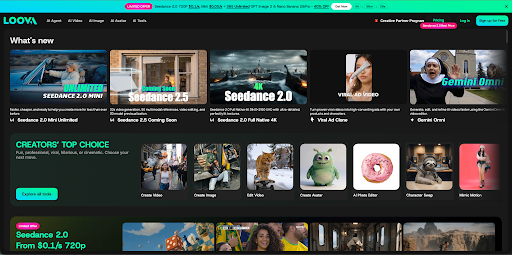
What makes it different is its multi-model approach. Instead of relying on a single generation model, Loova combines leading AI models including Seedance 2.0, Kling 3.0, GPT Image 2, and Nano Banana Pro, making it easy to compare results and choose the best output for different creative tasks without switching between multiple websites.
I often begin a project by generating visual concepts, refine those ideas with AI Image to Image, and then move directly into animation with an AI video generator. Having image generation and video generation inside the same workspace makes the entire production process much smoother.
This flexibility becomes especially valuable when creating multiple pieces of content every week. One day I might be producing product demonstrations, the next day cinematic storytelling videos, and later a series of UGC-style advertisements. Instead of rebuilding each project from scratch, I can simply switch models and continue working.
I also found Loova particularly useful for commercial content. Imagine launching a new coffee brand. You could generate product concepts, animate coffee steam, create multiple advertising styles, and compare different creative directions—all within one platform. That kind of efficiency is difficult to achieve when using separate tools.
PixVerse — Best for Viral Social Content
PixVerse feels like it was designed specifically for today's social media creators.
Its biggest strength is producing visually engaging clips that immediately capture attention. During testing, I found it particularly effective for transformation videos, dramatic reveals, and highly energetic opening sequences.
I experimented with several beauty product campaigns and generated multiple versions of the same advertisement in just a short amount of time. Being able to compare different visual hooks made it much easier to decide which creative direction worked best.
If your goal is to create fast-moving TikTok content with strong visual impact, PixVerse remains one of the strongest choices available.
Vidu — Best for Fast Daily Publishing
Vidu impressed me more with its speed than almost anything else.
Fast rendering completely changes how creators work. Instead of spending hours perfecting one idea, I could quickly generate several versions, compare them, and select the strongest result.
This approach works extremely well for creators who publish content every day.
I tested Vidu by creating technology news updates and product showcase videos. Because generation was so fast, I could easily respond to trending topics while they were still relevant. That ability to move quickly is a major advantage for anyone managing a Shorts or TikTok channel.
Runway — Best for Creative Editing
Runway continues to be one of the most versatile creative platforms available.
Unlike many AI generators that stop after producing a video, Runway gives creators far more control over refinement, transitions, and visual editing. It feels less like a simple generator and more like a complete creative toolkit.
One area where it really stands out is cinematic storytelling. During testing, I created several travel-style promotional videos featuring mountains, beaches, and city landscapes. The editing tools made it much easier to maintain a consistent visual identity across every scene.
Many creators also use AI Text to Video generation inside their creative process before refining the results with Runway's editing tools, making it an excellent option for creators who want both automation and creative control.
Kling AI — Best for Realistic Motion
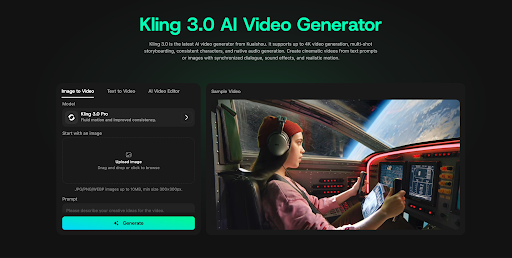
Whenever realism became the priority, Kling consistently delivered some of the strongest results.
Character movement feels smooth, environmental interactions look natural, and camera motion remains stable even during more complex scenes. Compared with many competitors, the overall realism is immediately noticeable.
I tested Kling with several fashion campaigns and lifestyle product videos. Instead of looking overly artificial, the generated footage felt remarkably close to traditionally filmed content.
If you create advertisements, product demonstrations, or lifestyle videos where believable motion is important, Kling remains one of the best platforms available.
Higgsfield — Best for Cinematic Camera Movement
Higgsfield approaches AI video generation differently from most platforms.
Rather than focusing on producing the largest number of videos as quickly as possible, it emphasizes cinematic camera language. Dynamic tracking shots, dramatic push-ins, and carefully directed framing help videos feel much closer to professionally produced film sequences.
I found it especially effective for fashion campaigns, music videos, and premium brand storytelling. A luxury watch company, for example, could create elegant teaser videos featuring dramatic lighting, slow camera movement, and cinematic pacing instead of ordinary product demonstrations.
Many creators also combine static concept art with AI Image to Video techniques before refining the final sequence inside Higgsfield. For creators who want every shot to feel intentional rather than purely generated, it is one of the strongest platforms currently available.
Pika — Best for Beginner-Friendly Animation
Pika remains one of the easiest AI video generators to recommend, especially for creators who are just getting started.
The interface is clean, straightforward, and designed for quick experimentation. Instead of overwhelming users with advanced settings, Pika encourages creators to focus on ideas and storytelling. During my testing, I found it particularly useful for animated explainers, reaction-style content, memes, and lightweight social videos.
If you're creating content for YouTube Shorts or TikTok and want to start producing videos quickly without a steep learning curve, Pika is one of the most accessible options available.
Hailuo AI — Best for Creative Visual Styles
Hailuo AI takes a very different approach from realism-focused platforms.
Its biggest strength is generating artistic, stylized visuals that immediately stand out in social feeds. Rather than trying to imitate real footage, it embraces imaginative lighting, surreal compositions, and expressive visual effects.
I experimented with several music promotion concepts and fantasy-themed social videos. The results were visually distinctive and felt more like digital artwork than traditional video production.
If your content relies on strong aesthetics and creative identity, Hailuo AI is well worth considering.
HeyGen — Best for AI Avatar Videos
Not every creator needs cinematic action scenes.
Many businesses, educators, and creators simply need someone on screen explaining an idea clearly. Recording these videos every day can quickly become time-consuming, especially for solo creators.
This is where HeyGen excels.
I tested it by turning written scripts into presenter-style videos featuring AI avatars. The experience was surprisingly efficient, making it easy to imagine applications such as product walkthroughs, educational tutorials, onboarding videos, and UGC-style advertising.
For creators who regularly publish talking-head content, HeyGen can dramatically reduce production time while maintaining a professional presentation.
CapCut AI — Best for Finishing Shorts and TikTok Videos
Generating a video is only part of the creative process. Every Short or TikTok still needs captions, transitions, music, and formatting before it is ready to publish.
CapCut AI continues to be one of the best tools for this final stage.
Its automatic captions, smart editing features, and mobile-first experience make it incredibly easy to prepare content for social media. I especially appreciated how quickly I could polish AI-generated footage without moving into more complicated editing software.
For creators publishing consistently, these small time savings quickly add up.
Which AI Video Generator Should You Choose?
The best platform depends on what you create most often.
For daily posting
If consistency is your priority, Vidu and PixVerse are excellent choices thanks to their fast generation speed and rapid content iteration.
For realistic commercial videos
Kling stands out with natural motion, believable environments, and polished product demonstrations that work particularly well for advertising.
For cinematic storytelling
Higgsfield and Runway offer stronger creative direction, dynamic camera movement, and more refined visual control for creators who want their videos to feel like miniature films.
For beginners
Pika and CapCut AI provide approachable interfaces that make AI video creation much less intimidating for first-time users.
For creators who need everything in one place
Loova remains my overall recommendation because it combines image generation, video generation, multiple leading AI models, and creative experimentation inside a single workspace. Instead of switching between separate tools, creators can complete much more of their production process in one platform.
Why AI Video Generators Matter More Than Ever
The biggest shift I noticed during testing was not visual quality—it was efficiency.
Creators are no longer limited by production time in the same way they were only a few years ago. AI makes it possible to generate multiple concepts, compare creative directions, and publish content far more consistently than traditional production methods.
Brands are already taking advantage of this change.
Small clothing companies create product launches without hiring production crews. Coffee shops produce seasonal campaigns in several visual styles. Mobile apps generate onboarding videos, feature announcements, and paid social advertisements for different audiences.
Instead of investing heavily in a single advertisement, businesses can now test multiple creative concepts and quickly identify what performs best.
For creators, that ability to experiment may be even more valuable than the technology itself.
Final Thoughts
AI video generators have moved far beyond simple creative experiments. They are becoming an essential part of modern content production.
Every platform has its own strengths. PixVerse is excellent for viral social content. Vidu makes daily publishing easier. Kling produces impressive realism. Higgsfield brings cinematic camera language to AI video creation. Runway offers exceptional creative control, while HeyGen solves talking-head production remarkably well.
For creators who regularly produce different types of content, I found Loova to be the most flexible solution because it combines multiple leading AI models with image generation and video generation inside one platform.
Ultimately, the best AI video generator is not the one with the longest feature list. It is the one that fits naturally into your creative process and helps you publish consistently.
As YouTube Shorts and TikTok continue rewarding creators who move quickly, platforms that make content creation faster and more flexible will only become more valuable.
FAQs
What is the best AI video generator for YouTube Shorts?
Loova, PixVerse, and Vidu are among the strongest choices for Shorts creators because they combine fast generation, flexible creative options, and efficient production.
Which AI video generator is best for TikTok?
PixVerse performs particularly well for trend-driven content, while Vidu is an excellent option for creators who publish frequently. Loova offers greater flexibility for creators managing multiple content formats.
Which AI video generator is best for commercial advertising?
Kling is a strong choice for realistic product videos, while Higgsfield excels at cinematic brand storytelling. Loova works especially well for teams that need to create multiple advertising assets within one platform.
Can AI video generators create videos automatically?
Yes. Most modern platforms can generate complete videos from text prompts or existing images. However, strong creative ideas, storytelling, and editing decisions still make the biggest difference in overall quality.
What is the difference between text to video and image to video?
Text to video generates scenes directly from written prompts, while image to video animates existing images into moving clips. Both approaches are useful, depending on whether you are starting from an idea or an existing visual.
Are AI video generators worth using for small businesses?
Absolutely. They allow small businesses to create promotional videos, product showcases, and social media content much faster and at a significantly lower cost than traditional video production.

Jim's passion for Apple products ignited in 2007 when Steve Jobs introduced the first iPhone. This was a canon event in his life. Noticing a lack of iPad-focused content that is easy to understand even for “tech-noob”, he decided to create Tabletmonkeys in 2011.
Jim continues to share his expertise and passion for tablets, helping his audience as much as he can with his motto “One Swipe at a Time!”