How AI Is Changing the Way We Build and Use Productivity Software: The Plan Before the Plan
A product manager at a US SaaS company opens Slack on a Tuesday morning. A sales lead has dropped four lines:
“Enterprise client wants SSO before Q3 rollout, legal needs a look, Priya knows the details.”
The PM opens Notion for the client page, Jira for what the auth team has queued, Google Calendar for when Priya is back, then retypes the whole thing as a ticket. Thirty minutes later, there is one epic and five subtasks. Nothing has been built. Nothing has even been planned.
That unpaid half hour is where AI is actually changing productivity software, and it is not where most vendors are putting it. The useful work is not the AI drafting your email. It is the AI removing the setup labor every tool quietly demands before it does anything for you.
I call it the plan-before-the-plan, and I was on the LITSLINK team that spent five months building a tool to delete it for one client. Here is what we learned, and why the industry's default move (add a sparkle icon, ship, announce) keeps missing the point.
The AI button is this decade's “Share to Facebook” button
Between late 2024 and mid-2025, nearly every productivity suite got its AI layer. Apple shipped Writing Tools in October 2024. Google folded Gemini into every Workspace Business and Enterprise plan in January 2025 and raised prices to match.
Microsoft put Copilot into consumer Microsoft 365 the same month. Notion bundled AI into its Business tier, then shipped agents in the fall of 2025.
Asana and Linear opened their trackers to agents. Look at where the AI sits in most of them and you find the same shape: a button next to a text field. Summarize this. Rewrite that. The workflow underneath is untouched.
The consensus defending this shows up in every roadmap meeting.
“Ship the AI button first. Users will tell us what they want it to do, and we can embed it deeper later. The important thing is to be in market with AI.”
I have heard that from founders, product leads, and once from a board member. It is wrong on the mechanics. A button sits at the end of a workflow, after the user has done the hard part: finding the context, deciding what matters, framing the request.
By the time you click “summarize,” the plan-before-the-plan is finished. The AI gets credit for the last five percent and none of the blame for the first ninety-five. Users notice.
Gartner put a number on the corporate version in July 2024, predicting that at least 30% of generative AI projects would be abandoned after proof of concept by the end of 2025, citing poor data quality, weak risk controls, rising costs, and unclear business value. Three of those four are symptoms of bolting AI onto a workflow instead of rebuilding the workflow around it.
What the plan-before-the-plan costs, in numbers?
Microsoft's 2025 Work Trend Index, a survey of 31,000 workers in 31 markets fielded in early 2025, found that employees are interrupted every two minutes during the workday, or 275 interruptions a day once off-hours pings are counted. Eighty percent of the workforce said they lack the time or energy to do their work.
Those are not numbers about a shortage of AI buttons. They are numbers about context scattered across tools and reassembled by hand by whoever coordinates: the PM, the ops lead, the founder still doing dispatch at 11 pm.
The best evidence that AI can take real work off a knowledge worker comes from a field experiment, not a vendor deck. In 2023, researchers from Harvard, Wharton, MIT and BCG ran a controlled study with 758 BCG consultants.
Those given GPT-4 completed 12.2% more tasks, finished them 25.1% faster, and produced work rated over 40% higher in quality on tasks inside the model's competence.
On a task chosen to sit outside it, the AI group was 19 percentage points less likely to get the right answer. The gain is real, and it only shows up when the tool keeps the AI inside the band of work it is good at.
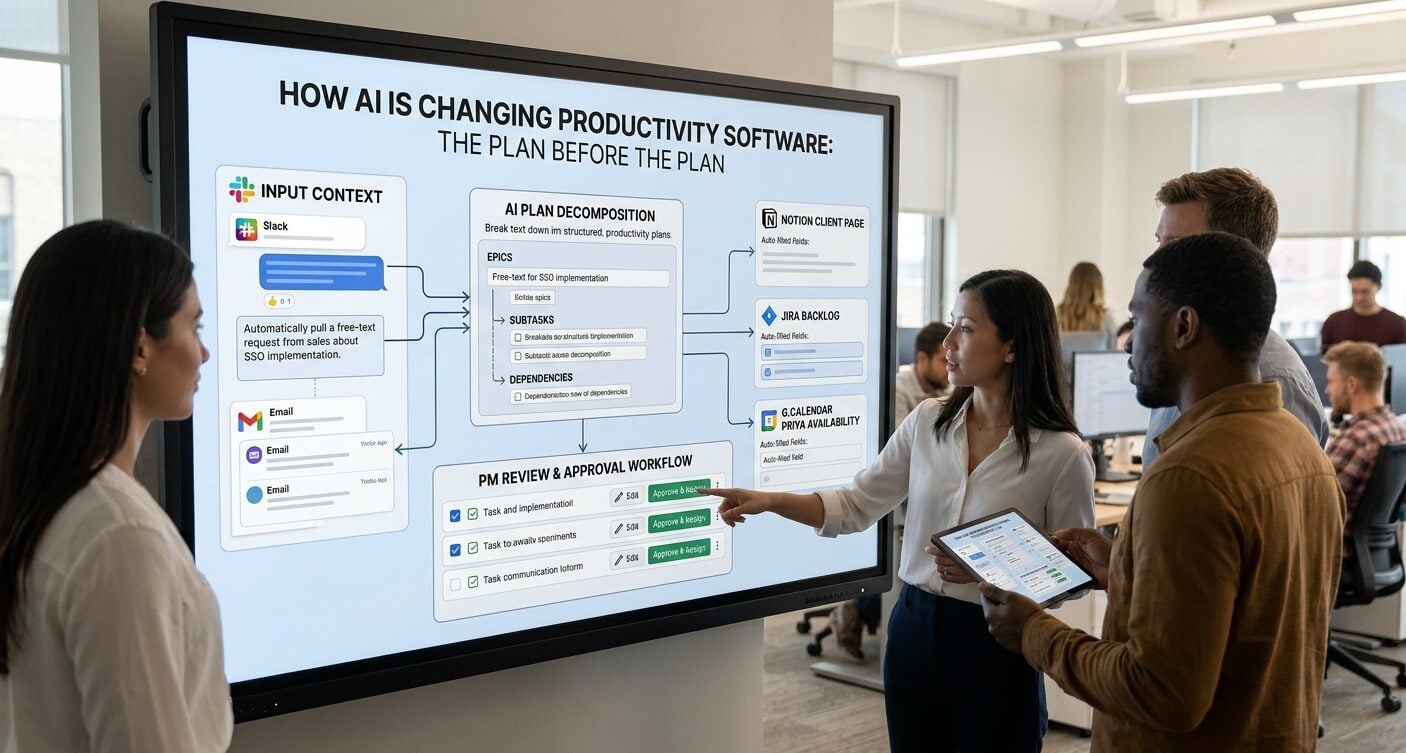
For the client we worked with, a product company in project management SaaS, the plan-before-the-plan ran through four places for every request: Slack (where it arrived as free text), Notion (client context), Jira (where it had to end up as tickets), and Google Calendar (stakeholder availability, checked by hand).
Details were re-typed three or four times along the way. A single request took 30 to 45 minutes to become assignable subtasks, and about 22% of briefs needed two or more rewrites because the first pass was too vague to estimate. Dependency problems surfaced only after a deadline slipped. None of that gets fixed by a summarize button.
Three places AI can live inside a productivity tool
The useful distinction is not “has AI” versus “does not.” It is where the model sits in the workflow, because that decides how much labor it removes and how it fails.
| AI bolt-on | AI-assisted workflow | AI-native tool
|
|
|---|---|---|---|
| Where the AI sits | A button at the end of an existing step (summarize, rewrite, draft) | Inside one step, with output flowing into the next step | The workflow is designed around model output, with a UI built for review |
| User effort before AI helps | High. User gathers context, frames the request, then clicks | Medium. User gives raw input, the tool pulls context and structures it | Low. User reviews, edits, approves |
| How trust is built | Rarely. Quality varies with how well the user prompted | Through visible structure: fields, suggestions, an easy edit path | Through audit trails, row-by-row approval, consistent behavior over hundreds of runs |
| Typical failure mode | Ignored after novelty fades, licensing cost stays | Over-trust in one step, errors propagate with no checkpoint | Silent errors or drift at scale if monitoring is weak |
Most big-name launches of 2025 live in column one. A few, like Linear's agent integrations, reach column two. Column three is still mostly custom-built, because it means redesigning the product around review rather than input, and that is a product decision, not a model decision.
What happened when we rebuilt the planning step for product managers?
The client came to us with a specific complaint, not a vague “we need AI.” Their PMs were human copy-paste layers between tools.
We scoped a tool they called RIV, an AI task planning assistant for product managers and ops leads. It takes an unstructured request, turns it into structured, ready-to-assign subtasks, and flags likely risks before sprint planning instead of after.
Five months, start to finish: a one-to-two-week discovery workshop, two weeks of prompt prototyping against more than 300 real briefs from the backlog, four months of two-week sprints, two weeks of QA.
The stack is a GPT-based pipeline for decomposition, paired with named-entity recognition and classification models that pull out dates, people, project references and tags, all stored in PostgreSQL with a full audit log and pushed into Jira.
What mattered most was not the model. It was the row-by-row “Approve and Assign” workflow with inline editing. A PM does not get a wall of generated text. They get a list of subtasks with the entities already filled in, and they approve, edit, or reject each row. That one decision put the tool in column three.
The numbers from the RIV case study, as reported by the client after launch:
Proof block: RIV, AI task planner, US project-management SaaS, 2025
- Time per brief fell from 30 to 45 minutes to 8 to 12 minutes, which the client reports as 60% faster task decomposition than manual ticket writing
- Roughly 8 hours per week freed per project manager, which across 14 PMs the client counts as close to three full-time roles of recovered capacity
- Named-entity extraction runs at over 90% accuracy on dates, names and tags, and fills over 90% of date and tag fields with no typing
- Median pipeline response time is under 3 seconds, and by prompt round four the median time from request to an approved subtask list was under 90 seconds
- About 3% of generated subtask sets needed a full rewrite, against the 22% of human-written briefs that needed two or more rewrites before
Where did the 8 hours come from? My inference, not something the client measured separately, is that most of it came from the 22%-to-3% rewrite drop rather than from faster generation.
Writing a subtask list again, after a developer has said “too vague to estimate,” costs the same time plus a meeting. Kill the second pass, and you recover both.
Yevhenii Melikov, a Machine Learning Engineer at LITSLINK who worked on the extraction models, shared a comment for this piece:
“The GPT step was the easy part. What took four prompt rounds was making the output boring enough that a PM would trust it on a Monday morning without reading every word. Boring means the same field order every time, the same handling of a missing date, and a visible flag when the model is guessing. We cut a lot of clever behavior to get there, and approvals went up every time we did.”
What it takes to build AI features people keep using?
It takes product work before model work, and the model work is mostly evaluation. Our team at LITSLINK has had AI in production since 2017, and the pattern across our AI development services engagements is consistent: a proof of concept takes four to eight weeks, a production system with integrations three to six months, and the projects that survive past month six are the ones where discovery included a data and workflow audit, the prototype ran on real client inputs (300 briefs for RIV), and audit logs and human-in-the-loop checkpoints were designed in rather than added after a scare.
The same page prices a single AI feature at roughly $8,000 to $25,000 and a custom system with integrations at $30,000 to $120,000, a useful check against the “we'll just call the API” budget.
The money is rarely in the model call. It is in the plumbing: pulling context from the tools where it lives, building the review surface, logging every decision, watching for drift.
Five design shifts AI forces on productivity software
- The default artifact becomes the output, not the input. Old productivity tools opened on a blank form. New ones should open on a draft the model already built, so the user's first action shifts from “create” to “correct.” The UI now has to show provenance (where did this date come from?) instead of a text field.
- Review surfaces matter more than generation quality. A model that is 90% accurate with a one-click correction path beats one that is 95% accurate with free-text output you have to re-read in full. The assistants people keep using are the ones where fixing a mistake costs less than the mistake.
- “I am guessing” has to be a visible state. The BCG experiment found a 19-point accuracy penalty when consultants used AI outside its competence. Productivity software hits that edge constantly. The fix is a flag, not a bigger model. RIV fills over 90% of date and tag fields and leaves the rest to the PM, so attention goes exactly where the model was unsure.
- Integrations stop being optional. A planner that cannot read the Slack thread, the Notion page and the Jira backlog is a text box with a model behind it. An AI feature that still asks the user to gather and paste that context has not removed labor. It has moved it.
- The audit log becomes a product feature. In 2023, nobody put “every AI decision is logged with its input” on a feature list. In 2026, ops leads ask about it in the first demo. Mostly for trust: a PM approves a generated subtask faster when they can trace where it came from, and a manager rolls the tool out wider when the log shows how often humans overrode it. Log every human edit from day one, by field.
What to do now if you build or buy productivity software?
- Map the plan-before-the-plan for one role. Pick your heaviest coordinator, sit next to them for a morning, and write down every tool they open and every detail they re-type before the “real” tool becomes useful. That map is the spec.
- Measure rewrites, not just time. Time per task is the easy metric to game. Count how often a brief, ticket or plan gets sent back for a second pass. That number (22% at the client before RIV) is the one AI can push toward low single digits.
- Prototype against your real inputs, never a demo set. Real inputs have missing dates, nicknames, and projects renamed twice. If the prototype only works on clean examples, it does not work.
- Design the review surface before the prompt. Decide how a user accepts, edits, or rejects each unit of output. One click per row is a good default. If the answer is “they read the paragraph and copy what they need,” you are building a bolt-on, and you should expect bolt-on usage.
- Buy column one, build column two or three. If a summarize button is all you need, the suites already include it in your subscription. If the labor you want to remove is the context-gathering and structuring step, no suite will do that for your workflow, and a custom build with a four-to-eight-week proof of concept is the realistic path.
Where productivity software is heading next?
Suites will keep adding buttons, because buttons are cheap and announce well. The interesting work will happen one layer down, in tools that own one coordination step and treat the suites as data sources.
Microsoft's report framed 2025 as the year of the “Frontier Firm,” with 81% of leaders expecting agents to be moderately or extensively integrated into their AI strategy within 12 to 18 months.
What that implies is that the unit of productivity software stops being the document and becomes the handoff. Whoever removes the most handoff labor wins the seat.
For small teams, that is good news. You do not need a frontier lab or a seven-figure budget to delete a half hour of re-typing from every request.
You need a map of where that half hour goes, a prototype tested on your own mess, and a review surface your people trust on a Monday morning. Our team at LITSLINK has built enough of these to know the projects that fail are the ones that skipped the map.
Nobody ever got eight hours a week back from a button.

Jim's passion for Apple products ignited in 2007 when Steve Jobs introduced the first iPhone. This was a canon event in his life. Noticing a lack of iPad-focused content that is easy to understand even for “tech-noob”, he decided to create Tabletmonkeys in 2011.
Jim continues to share his expertise and passion for tablets, helping his audience as much as he can with his motto “One Swipe at a Time!”