
Responsive Design Is the Key to Reaching More Mobile Users
The smallest screen has become the most powerful window. Whether reading news, shopping, or playing games, people rely on their phones for nearly everything.
Yet many websites still feel cramped, cluttered, or broken on them. Responsive design bridges that gap, giving each visitor an experience that fits their device. It is the clearest path to reaching more mobile users and earning their trust from the first tap.

Why Mobile Has Quietly Become the Default Screen?
Most online traffic now comes from phones, not desktops. This shift happened quietly, through habits formed on commutes, in cafés, and during breaks.
Each scroll adds up to a new expectation: that a site should load fast, look clean, and function smoothly, no matter the screen size. Visitors no longer wait for pages that stutter or stretch awkwardly. They simply move on.
A responsive design keeps that from happening. It adapts automatically, rearranging elements for readability and speed.
Rather than forcing a desktop layout onto a phone, it reshapes the experience to match the device. This small difference changes everything about how users interact and whether they stay.
What Responsive Design Actually Means Today?
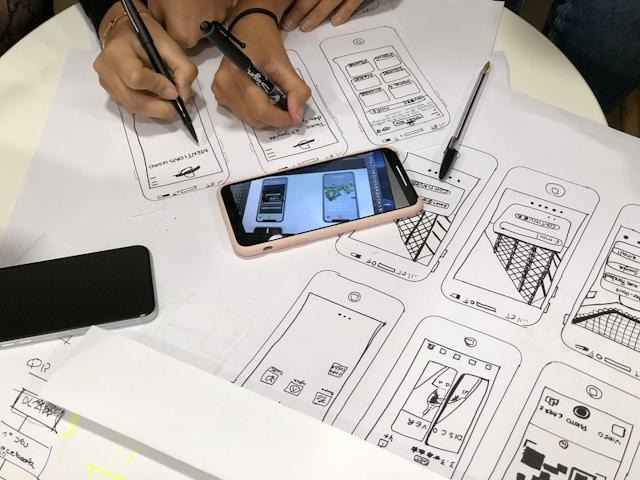
Responsive design is not about shrinking pages. It is about adapting structure and content for different devices. Flexible grids, adjustable images, and breakpoints help each element fit naturally on a screen. The goal is to make a site feel like it was built for every device, not resized as an afterthought.

Designers now think in terms of thumbs, not cursors. Navigation must be large enough to tap easily. Buttons must be spaced well enough to prevent errors.
Simple spacing and intuitive flow define success more than fancy visuals. The easier it is to move around a site, the more people engage.
How Responsive Design Shapes User Experience on Phones?
Good design is shaping behavior and reaching more mobile users. When text is legible, menus are simple, and images scale cleanly, people stay longer.
They read more, scroll further, and convert more often. In that sense, responsiveness does more than improve looks — it preserves attention.
This attention signals trust. A site that works everywhere feels modern and reliable. A site that breaks feels neglected. Because most users now encounter brands through mobile first, even small flaws — like overlapping buttons or hidden menus — can harm credibility.
Making Your PPC Dollars Work Harder on Mobile
Advertising budgets often focus on visibility, but responsiveness shapes performance. Many clicks happen on phones, where screens are smaller and attention shorter. Landing pages that adapt well convert better because they remove friction from the path to purchase.
The key is alignment. Your layout, copy, and pay-per-click strategy for mobile must work together. Ads that promise simplicity must lead to pages that deliver it.
A fast-loading page with one clear button outperforms a cluttered desktop-style layout every time. By optimizing both ad and landing page for mobile, you spend less and gain more
The SEO Upside of Getting Mobile Right
Search engines now judge sites primarily by their mobile versions. This shift means responsive design affects visibility as much as aesthetics.
Google’s mobile-first indexing rewards sites that load fast and display well on phones. Lagging behind in responsiveness can quietly push a page lower in results.
Performance plays a part too. A responsive layout helps remove unnecessary code and reduce image weight.
Faster loading improves engagement metrics, which further strengthens rankings. The cleaner your structure, the better search engines — and users — understand your site.
Designing With Mobile Content Priorities in Mind
Small screens on mobile devices demand sharper focus. You must decide what deserves the limited space “above the fold.” Key messages, images, or calls to action should appear immediately. Extra details can move lower. By forcing this discipline, mobile-first thinking improves content everywhere.
Menus, forms, and pop-ups also need rethinking. Complex navigation collapses into simple icons. Long forms shorten or support autofill.
These small adjustments save time and remove frustration. The easier it is to act, the more likely people are to finish what they started.
Testing Your Site on the Devices People Actually Use
A resized browser window on a laptop is not the same as a real phone. Touch interaction, network speed, and screen clarity all behave differently in the real world. Testing across actual devices reveals problems that simulations miss — tiny fonts, slow buttons, misplaced banners.
Analytics and feedback help too. Look at where users drop off, where they pause, and what they ignore. Ask visitors for comments.
The best design changes come from small patterns repeated by many people. Treat responsiveness as a habit of listening rather than a single update aimed at perfection.
Practical Steps to Bring a Legacy Site Into the Mobile Era
Older websites often carry years of design baggage. Fixing that starts with an honest audit. Check how your pages appear on multiple screens.
Look for text that overflows, buttons that vanish, or forms that break. Start by improving the pages that drive the most conversions.
Next, choose tools built for responsiveness. Modern templates and content management systems handle scaling automatically. But even the best systems need human oversight.
Review updates regularly, test new pages, and prioritize speed. Continuous refinement keeps your site aligned with user habits that change faster than design trends.
Looking Ahead
Phones evolve quickly, yet the principle remains steady. Whether users browse from a tablet, a foldable, or a smartwatch, they expect an experience that feels effortless.
Responsive design keeps pace without constant reinvention. It allows one site to serve every user gracefully, adapting as devices and behaviors shift.
If your site can deliver that experience, you stand a better chance of reaching more mobile users over time. Every tap becomes an opportunity for connection, every scroll a chance to hold attention.
In an age where attention is rare, respect for the small screen earns loyalty. Responsive design turns that respect into growth, one visitor at a time.

Jim’s passion for Apple products ignited in 2007 when Steve Jobs introduced the first iPhone. This was a canon event in his life. Noticing a lack of iPad-focused content that is easy to understand even for “tech-noob”, he decided to create Tabletmonkeys in 2011.
Jim continues to share his expertise and passion for tablets, helping his audience as much as he can with his motto “One Swipe at a Time!”